Microsoft Office 2019 Pro Plus download install Activation guide
Nowadays, one of the most widely used computer programmes is Microsoft Office 2019 Pro Plus. We use this software to carry out much of our daily work. We use Microsoft Office for both our office work and our homework. It is a comprehensive office suite with a wide range of tools. However, many of us do not know how to download Office 2019 onto our devices. So this is what we will be looking at. We will find out how to download Microsoft Office 2019 and install it on our computer. By following a few simple steps, we can install it.
How to Download Microsoft Office 2019 for Free?
The process for downloading Office 2019 is very simple. The steps are set out below. If you follow these steps, you will be able to download the Office 2019 Pro software.
- Go to Microsoft’s official website:
- Sign in on their website (if you don’t have a Microsoft account, create a new one).
- Redeem your product key (if you don’t have one, you can get a key from us).
- Download the setup file.
We have an easier way to do that. Click the button below to download the Office 19 setup ISO file directly.
How to Install and Activate Office 2019 Pro Plus?
The download is now complete, but we now need to understand how to install and activate Office 2019 Pro Plus. We’ll explain this in a few simple steps.
- Open the downloaded setup file.
- You will see a file called Setup.exe.
- Run that file and follow the instructions below.
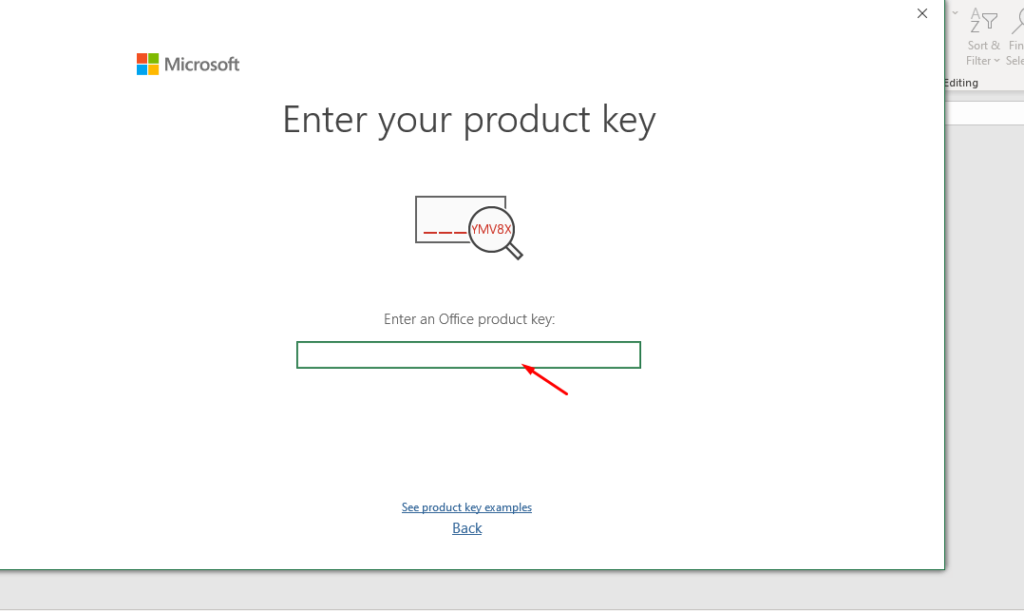
- Once the installation is complete, a new window will open asking for the product activation key.
- Enter the product key and click ‘Activate’. (Note: if you don’t have one, you can purchase one from our shop)
You can also activate it using the Microsoft Office Professional Plus 2019 confirmation ID. This is known as mobile activation. The process is very simple. Once you have opened the Office Activation Wizard, you need to select ‘Activate Office software by telephone’. We have a comprehensive guide on this topic. Read it if you would like to find out more.
Article: How to Activate Office by Phone
Why do I need a product key for Office 2019?
Microsoft Office 2019 includes many useful tools such as Word, Excel, PowerPoint, OneNote, Outlook, Publisher and many more. All these applications have outstanding features and functions. You cannot use all of them when using Office without activation. You will have very limited access, which will affect your work. A Microsoft Office activation key is essential for professional work. An Office product key looks like (XXXXX-XXXXX-XXXXX-XXXXX-XXXXX) 25-character code. If you activate your Office suite with a valid product key, you can receive Microsoft’s official support for any issues relating to Office 2019 Pro Plus.
How can I get a Microsoft Office 2019 Pro product key?
Get an Office 2019 Pro key at the cheapest price on the market
There are several ways to obtain an Office 2019 licence key. You can go directly to the Microsoft Store and purchase a product key from them. Furthermore, many reputable retailers of software keys, such as our shop, sell Office activation keys at affordable prices. You can save up to 80% by buying from us. But the common question is: how can we sell them at a lower price than Microsoft? Let me explain: we sell retail and OME keys. That’s why our prices are so low.
Can I get an Office 2019 product key for free?
Many sources will show you how to get the Office 2019 Pro product key for free. But what you may not realise is that they always provide cracked versions of this software, which is not a good idea. It carries a high risk. Also, do not use any Office 2019 activator software. Your system could be hacked at any time if you’re using cracked software. There’s no way to get a free product key for Microsoft Office. However, you can buy a retail key from us for just €10.95 and save money, or, if you can afford it, you can buy the official product key from the Microsoft Store.